AI capability models
Draft v0.1
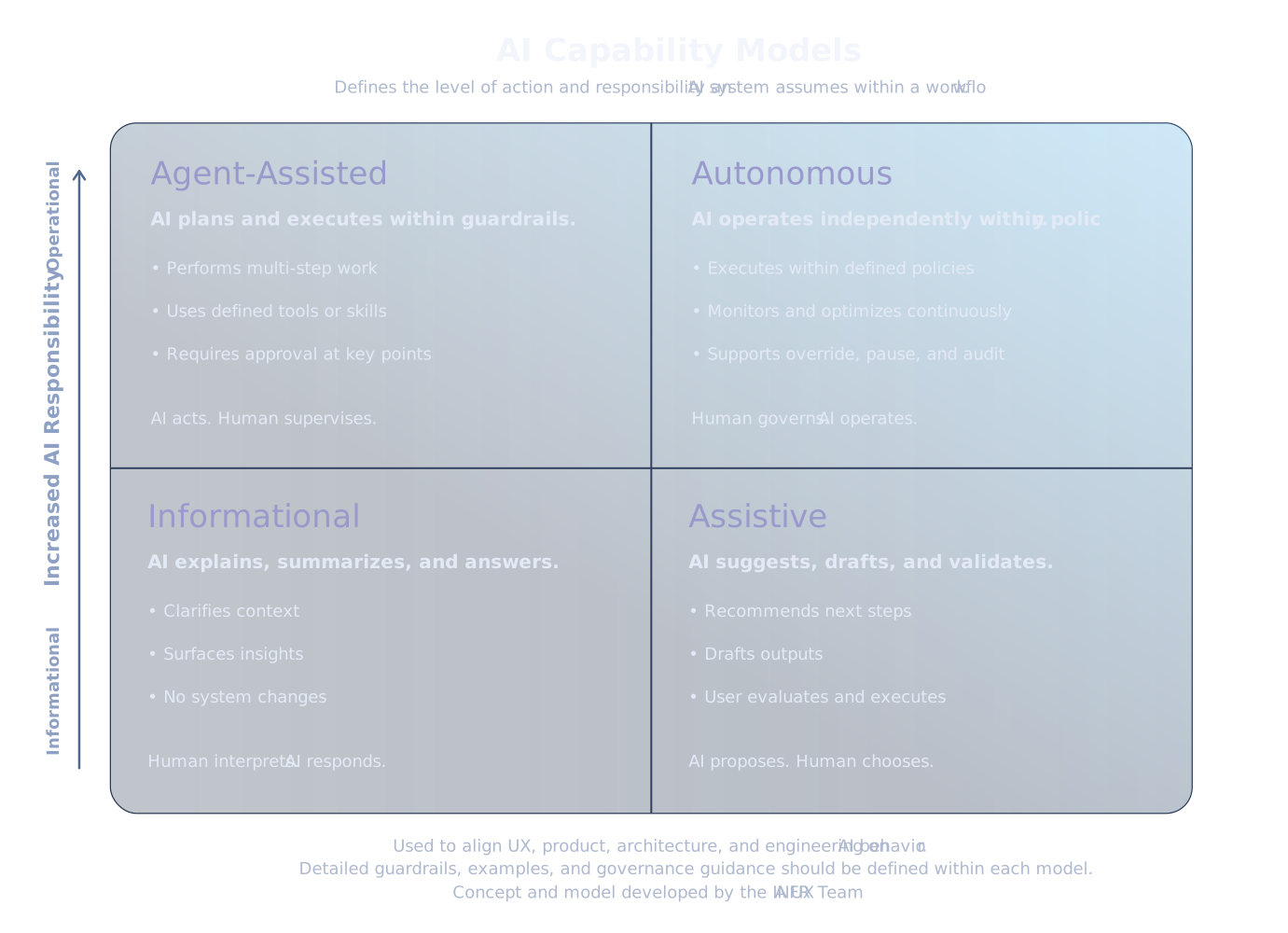
AI capability models define how much responsibility an AI system takes within a workflow—from informing users to acting on their behalf.
This framework helps teams align on how AI should behave, ensuring that design, product, and engineering decisions consistently reflect the appropriate level of control, risk, and user involvement.
How to use these models
Use these models to determine the appropriate role of AI in a given experience:
- Informational — when users need understanding or insight
- Assistive — when users need help making decisions
- Agent-Assisted — when tasks can be executed with user oversight
- Autonomous — when systems can operate independently within defined policies
The goal of AI UX is not maximum trust, but appropriate trust for the context—so users neither underuse valuable AI nor over-rely on uncertain outputs.
When users can clearly understand what the AI is doing, what it will do next, and how to approve, correct, or reverse it, they can work with greater confidence while reducing operational errors, support burden, and hesitation around higher-value automation.
Selecting the right model ensures AI behavior matches user intent, builds appropriate trust, and aligns with the level of risk in the workflow. It also improves usability by making AI experiences more understandable, controllable, and effective for users.
1. Informational AI (RAG / Knowledge Assistance)
AI informs, but does not influence or act
Characteristics
- Explains, summarizes, answers questions
- Provides context and insight
- No system changes or state mutation
- No workflow ownership
User role
Interprets and decides independently
UX implications
- Emphasize clarity and source grounding
- Avoid prescriptive language
- Keep interaction lightweight
Examples
- In-product help assistant
- Documentation chat
- “Why is this happening?” explanations
2. Assistive AI (Decision Support)
AI suggests, user decides
Characteristics
- Drafts, recommends, validates
- Operates within an existing workflow
- Does not execute actions independently
User role
Evaluates, edits, and approves
UX implications
- Show confidence and rationale
- Provide alternatives or edits
- Make acceptance/rejection easy
Examples
- Report generation assistance
- Configuration recommendations
- Step-by-step setup guidance
3. Agent-Assisted AI (Operational with Oversight)
AI executes tasks with user approval and guardrails
Characteristics
- Performs multi-step actions
- Executes defined “skills” or workflows
- Requires user approval at key steps
- Operates within governance boundaries
User role
Delegates and supervises
UX implications
- Require explicit consent before execution
- Provide visibility into planned actions
- Support interruption, rollback, and audit
Examples
- Guided remediation workflows
- Multi-step configuration automation
- Ops orchestration (like Opsmith-style flows)
4. Agent-Autonomous AI (Fully Operational)
AI acts independently within defined constraints
Characteristics
- Executes workflows without real-time user approval
- Continuously monitors and responds to conditions
- Operates under predefined policies and safeguards
User role
Defines rules, monitors outcomes
UX implications
Strong emphasis on:
- transparency (what happened and why)
- auditability control (pause, override, rollback)
Clear communication of scope and limits
Examples
- Auto-scaling infrastructure based on load
- Self-healing systems (auto-remediation)
- Policy-driven traffic routing adjustments
Future Measurement Layers
These future measurement layers define how we will assess the real impact of AI on user behavior, decision quality, and long-term product outcomes.
- Informational → engagement metrics
- Assistive → acceptance / override rates
- Operational → success / rollback / trust signals
Further reading
For additional guidance on designing AI experiences that are trustworthy, transparent, and aligned to risk, see: